Capstone 1 — BonicBot Visitor Check-In
Learning Objective
Build a complete AI-powered visitor check-in system by combining face detection, gesture recognition, ArUco marker detection, speech synthesis, and a finite state machine into a single BonicBot application.
Introduction
Over the last five lessons, you’ve taught BonicBot several individual vision skills.
It can now:
- detect faces
- recognize hand gestures
- identify ArUco markers
- respond using speech
In this capstone project, you’ll combine all of these abilities into a single intelligent robot application.
Project Scenario
Imagine BonicBot is working as the receptionist for a workshop or classroom.
When a visitor approaches, the robot should:
- Detect that someone is standing in front of it.
- Ask the visitor to confirm their presence by showing an Open Palm gesture.
- Ask the visitor to present their ID badge (an ArUco marker).
- Verify the badge against a registered list of visitors.
- If registered, welcome the visitor by name. If not registered, deny access.
- Return to its waiting state, ready for the next visitor.
Instead of treating these as separate programs, BonicBot manages the entire interaction using a Finite State Machine (FSM). At any moment, the robot is only responsible for one task, making the behavior predictable and easy to understand.
Setup: Installing Packages
Before running the code, make sure your computer (or the robot’s onboard system, if the voice code runs there) has the required software installed. Open a terminal and run:
pip install bonicbot-bridge opencv-pythonWhat each package / tool does
| Package / Tool | Purpose |
|---|---|
bonicbot-bridge | The official BonicBot SDK. Provides the BonicBot class used to connect to the robot, control its camera, switch between 'face', 'gesture', and 'aruco' detection modes, and read back faces, gestures, and badge IDs. Also provides BonicBotError for safe error handling. |
opencv-python | Imported as cv2. Used to draw the kiosk’s stats panel and status text, and to display the live video window. |
piper (Piper TTS) | A command-line text-to-speech engine invoked via subprocess, not imported as a Python package. It converts text into a .wav file using a neural voice model. Install it separately, e.g. pip install piper-tts, or follow the install instructions at the Piper project for your platform. |
aplay | A command-line audio player (part of alsa-utils on Linux) used to actually play the .wav file Piper generates. On Debian/Ubuntu-based systems: sudo apt install alsa-utils. |
| Piper voice model | The code expects a voice model file at /root/piper_voices/en_US-amy-medium.onnx (set via the PIPER_MODEL constant). Download a Piper voice (.onnx + its matching .onnx.json) and update PIPER_MODEL to point at wherever you saved it if your path is different. |
This lesson doesn’t use pyttsx3 like Lesson 5 — it uses Piper instead, which produces more natural-sounding speech but requires the extra CLI tools and model file above rather than a single pip install.
If pip install fails, try pip3 install ... instead, or use a virtual environment:
python3 -m venv bonicbot-env
source bonicbot-env/bin/activate   # On Windows: bonicbot-env\Scripts\activate
pip install bonicbot-bridge opencv-python
How to run the program
-
Find your BonicBot’s IP address. Check the robot’s on-device display, its companion app, or your router’s connected-devices list.
-
Save both code parts into one file, e.g.
capstone1_checkin.py— Part 1 (helper classes/constants) first, followed directly by Part 2 (the state machine and main loop). -
Replace
[IP_ADDRESS]in the code with your robot’s actual IP address (see the callout box under the code block). -
Confirm Piper and
aplayare installed and working, and thatPIPER_MODELpoints to a real voice model file on the system running this script. -
(Optional) Connect a Bluetooth speaker to your BonicBot to hear the spoken prompts and welcome messages. Detection and check-in logic still work without one — you just won’t hear the voice output.
-
Print or prepare ArUco badges for each visitor ID you want to test (the demo registers IDs
1–4asAlice,Ben,Charlie, andDavidin theVISITORSdictionary). -
Run the script:
python capstone1_checkin.py -
A window titled “BonicBot Visitor Check-In” should open, showing the current state, on-screen instructions, and any countdown timer.
-
Walk through the flow: appear in front of the camera → show an Open Palm → present a badge → hear the welcome message (or denial) → the kiosk resets automatically.
-
Press
qwith the video window focused to stop the program and exit cleanly.
Don’t have a physical BonicBot? Try it in simulation (optional)
If you don’t have physical access to a BonicBot, you can still work through this capstone using the ROS 2 simulation environment instead of a real robot:
-
Launch the BonicBot simulation:
ros2 launch my_bot robot_system.launch.py use_sim_time:=true world:=obsworld.sdf use_real_camera:=Trueuse_real_camera:=True— the camera feed comes from your laptop’s webcam, while the robot’s body and motion are still simulated. This is the easiest way to test detection, since you can just hold whatever you want detected up to your laptop camera — in this case, your own face, an Open Palm gesture, and a printed ArUco badge, in turn.use_real_camera:=False— the camera feed comes from Gazebo instead (i.e. whatever the simulated camera sees inside the simulated world).
-
Once the simulation is running, use
localhostas the host instead of a physical IP address:with BonicBot(host="localhost", port=9090, timeout=10) as bot: -
Everything else in the code — the state machine, face/gesture/badge detection, and the Piper voice prompts — works the same way, since the simulation exposes the same interface as a real robot.
This path is mainly useful for exploring the capstone without hardware on hand; if you have a real BonicBot, connecting to its actual IP address is the recommended way to go through this project.
Code
Part 1 — Helper Classes and Utility Functions
import time
import cv2
import threading
import queue
import subprocess
import tempfile
import os
from bonicbot_bridge import BonicBot, BonicBotError

PIPER_MODEL = "/root/piper_voices/en_US-amy-medium.onnx"


class VoiceSpeaker:
    """Background TTS worker using Piper (ONNX) for natural-sounding speech.
    Generates a WAV file via the piper CLI, then plays it with aplay.
    Runs in a daemon thread with a queue so announcements never block
    the camera loop."""

    def __init__(self):
        self._queue = queue.Queue()
        self._process = None          # currently-playing aplay process
        self._thread = threading.Thread(target=self._run, daemon=True)
        self._thread.start()

    def _run(self):
        while True:
            text = self._queue.get()
            if text is None:
                break
            try:
                # Generate WAV with Piper
                with tempfile.NamedTemporaryFile(suffix=".wav", delete=False) as tmp:
                    wav_path = tmp.name
                piper_cmd = [
                    "piper", "-m", PIPER_MODEL,
                    "-f", wav_path,
                    "--sentence-silence", "0.2",
                ]
                proc = subprocess.run(
                    piper_cmd, input=text, capture_output=True, text=True, timeout=15,
                )
                if proc.returncode != 0:
                    print(f"⚠️ Piper error: {proc.stderr.strip()}")
                    continue

                # Play WAV with aplay
                self._process = subprocess.Popen(
                    ["aplay", "-q", wav_path],
                    stdout=subprocess.DEVNULL, stderr=subprocess.DEVNULL,
                )
                self._process.wait()
                self._process = None
            except Exception as e:
                print(f"⚠️ TTS playback error: {e}")
            finally:
                try:
                    os.unlink(wav_path)
                except OSError:
                    pass

    def speak(self, text):
        self._queue.put(text)

    def stop(self):
        # Signal the worker to exit
        self._queue.put(None)
        # Kill any in-progress playback so we don't hang
        if self._process and self._process.poll() is None:
            self._process.terminate()
        self._thread.join(timeout=2)


# --- Only one onboard vision pipeline can be active at a time, so the kiosk
# swaps bot.enable_detection() modes as it moves through each stage:
# 'face' -> 'gesture' -> 'aruco' -> (disabled during the welcome message).

STATE_WAIT_FACE = 0
STATE_WAIT_GESTURE = 1
STATE_WAIT_BADGE = 2
STATE_WELCOME = 3

STATE_NAMES = {
    STATE_WAIT_FACE: "Waiting For Face",
    STATE_WAIT_GESTURE: "Waiting For Gesture",
    STATE_WAIT_BADGE: "Waiting For Badge",
    STATE_WELCOME: "Welcome Visitor",
}

GESTURE_NAME = "Open_Palm"
FACE_HOLD_FRAMES = 5
GESTURE_HOLD_FRAMES = 8
BADGE_HOLD_FRAMES = 8
GESTURE_LOST_GRACE = 8   # frames of no-gesture tolerated before resetting streak

GESTURE_TIMEOUT = 15.0   # seconds
BADGE_TIMEOUT = 10.0     # seconds
WELCOME_DISPLAY_TIME = 3.0  # seconds

VISITORS = {
    1: "Alice",
    2: "Ben",
    3: "Charlie",
    4: "David"
}
FLASH_DURATION = 12  # frames the border pulse stays visible after check-in completes


class FaceTracker:
    """Requires several consecutive frames with a face detected before
    confirming, filtering out stale / false-positive single-frame hits
    from the vision pipeline."""

    MISS_TOLERANCE_FRAMES = 2

    def __init__(self, hold_frames):
        self._hold_frames = hold_frames
        self._streak = 0
        self._missed = 0

    def update(self, faces):
        if faces:
            self._streak += 1
            self._missed = 0
        else:
            self._missed += 1
            if self._missed > self.MISS_TOLERANCE_FRAMES:
                self._streak = 0
                self._missed = 0

        return self._streak >= self._hold_frames

    def reset(self):
        self._streak = 0
        self._missed = 0


class BadgeTracker:
    """Same idea as MarkerTracker in the ArUco lesson: tracks a single badge
    ID's visibility streak and tolerates brief dropouts before resetting.
    Confirmed once the same marker ID has held for HOLD_FRAMES polls."""

    MISS_TOLERANCE_FRAMES = 3

    def __init__(self, hold_frames):
        self._hold_frames = hold_frames
        self._marker_id = None
        self._streak = 0
        self._missed = 0

    def update(self, marker_ids):
        marker = marker_ids[0] if marker_ids else None

        if marker is not None and marker == self._marker_id:
            self._streak += 1
            self._missed = 0
        elif marker is not None:
            self._marker_id = marker
            self._streak = 1
            self._missed = 0
        else:
            self._missed += 1
            if self._missed > self.MISS_TOLERANCE_FRAMES:
                self._marker_id = None
                self._streak = 0
                self._missed = 0

        if self._marker_id is not None and self._streak >= self._hold_frames:
            return self._marker_id

        return None

    def reset(self):
        self._marker_id = None
        self._streak = 0
        self._missed = 0


def normalize_hands(raw):
    """Parses raw gesture payload into a unified list, matching the format
    used by the working reference gesture-control code."""
    if not raw:
        return []

    hands = []
    for item in raw:
        if not isinstance(item, dict):
            continue

        gesture = item.get("gesture") or item.get("label")
        # The pipeline returns the string "None" when confidence is low
        if gesture == "None":
            gesture = None

        score = item.get("score", item.get("confidence"))
        handedness = item.get("handedness") or item.get("hand")
        raw_points = item.get("landmarks") or item.get("keypoints")

        landmarks = []
        if raw_points:
            for idx, kp in enumerate(raw_points):
                if isinstance(kp, dict):
                    x, y = kp.get("x"), kp.get("y")
                    vis = kp.get("visibility", kp.get("confidence", 1.0))
                else:
                    vals = list(kp)
                    x, y = vals[0], vals[1]
                    vis = vals[2] if len(vals) >= 3 else 1.0
                if x is None or y is None:
                    vis = 0.0
                landmarks.append({"x": x, "y": y, "visibility": vis})

        hands.append({
            "gesture": gesture,
            "score": score,
            "handedness": handedness,
            "landmarks": landmarks,
        })
    return hands


def draw_hud(frame, state_name, status, fps, flash_frames_left):
    """Translucent stats panel showing the current kiosk state and
    step-specific status message, plus a brief border flash once a
    visitor completes the whole check-in flow."""
    h_px, w_px = frame.shape[:2]
    panel_w, panel_h = 360, 96
    overlay = frame.copy()
    cv2.rectangle(overlay, (10, 10), (10 + panel_w, 10 + panel_h), (0, 0, 0), -1)
    frame = cv2.addWeighted(overlay, 0.55, frame, 0.45, 0)

    cv2.putText(frame, f"State: {state_name}", (22, 36),
                cv2.FONT_HERSHEY_SIMPLEX, 0.6, (0, 255, 0), 2)
    cv2.putText(frame, status, (22, 60),
                cv2.FONT_HERSHEY_SIMPLEX, 0.56, (0, 200, 255), 2)
    cv2.putText(frame, f"FPS: {fps:.1f}", (22, 82),
                cv2.FONT_HERSHEY_SIMPLEX, 0.5, (180, 180, 180), 1)

    if flash_frames_left > 0:
        cv2.rectangle(frame, (2, 2), (w_px - 3, h_px - 3), (0, 255, 0), 4)

    return frame


speaker = VoiceSpeaker()
face_tracker = FaceTracker(FACE_HOLD_FRAMES)
badge_tracker = BadgeTracker(BADGE_HOLD_FRAMES)
Part 2 — Visitor Check-In State Machine
with BonicBot(host='[IP_ADDRESS]', port=9090, timeout=10) as bot:
    print("📷 Starting camera and streaming...")
    bot.system.start_camera()
    bot.start_camera()
    bot.camera.wait_for_image(timeout=5.0)

    print("🙂 Enabling face detection, waiting for a visitor...")
    try:
        bot.enable_detection('face')
    except BonicBotError as e:
        print(f"⚠️ Could not enable face detection: {e}")

    print("✅ Visitor check-in kiosk active. Press 'q' to quit.\n")

    state = STATE_WAIT_FACE
    state_start = time.time()
    prev_time = time.time()
    fps = 0.0
    status = "Please look at the camera"
    flash_frames_left = 0

    # Gesture debounce state (mirrors the reference gesture-control code)
    last_frame_gesture = None
    same_gesture_count = 0
    stable_gesture = None
    lost_frames = 0

    try:
        while True:
            frame = bot.camera.get_latest_image()
            if frame is None:
                if cv2.waitKey(1) & 0xFF == ord('q'):
                    break
                time.sleep(0.01)
                continue

            now = time.time()
            dt = now - prev_time
            prev_time = now
            if dt > 0:
                fps = fps * 0.9 + (1.0 / dt) * 0.1

            # ---- STATE_WAIT_FACE ----
            if state == STATE_WAIT_FACE:
                status = "Please look at the camera"

                if face_tracker.update(bot.get_faces()):
                    ts = time.strftime("%H:%M:%S")
                    print(f"[{ts}] 🙂 Face detected, waiting for gesture...")
                    speaker.speak("Hello! Please show an open palm to continue.")
                    face_tracker.reset()
                    state = STATE_WAIT_GESTURE
                    # Reset debounce state for fresh gesture detection
                    last_frame_gesture = None
                    same_gesture_count = 0
                    stable_gesture = None
                    lost_frames = 0
                    bot.enable_detection('gesture')
                    state_start = time.time()   # start timeout AFTER pipeline is live

            # ---- STATE_WAIT_GESTURE ----
            elif state == STATE_WAIT_GESTURE:
                remaining = max(0.0, GESTURE_TIMEOUT - (now - state_start))
                status = f"Show an Open Palm ({remaining:.1f}s left)"

                raw_gestures = bot.get_gesture_full()
                hands = normalize_hands(raw_gestures)
                raw_gesture = hands[0]["gesture"] if hands else None

                # Tolerate brief detection dropouts (reference pattern)
                if raw_gesture is not None:
                    lost_frames = 0
                    current_gesture = raw_gesture
                else:
                    lost_frames += 1
                    current_gesture = stable_gesture if lost_frames <= GESTURE_LOST_GRACE else None

                # Debounce: require GESTURE_HOLD_FRAMES of the same gesture
                if current_gesture == last_frame_gesture:
                    same_gesture_count += 1
                else:
                    last_frame_gesture = current_gesture
                    same_gesture_count = 1

                if same_gesture_count == GESTURE_HOLD_FRAMES and current_gesture != stable_gesture:
                    stable_gesture = current_gesture

                if stable_gesture == GESTURE_NAME:
                    ts = time.strftime("%H:%M:%S")
                    print(f"[{ts}] 🟢 Gesture confirmed, waiting for badge...")
                    speaker.speak("Gesture confirmed. Please scan your badge.")
                    state = STATE_WAIT_BADGE
                    state_start = now
                    badge_tracker.reset()
                    # Reset debounce state
                    last_frame_gesture = None
                    same_gesture_count = 0
                    stable_gesture = None
                    lost_frames = 0
                    bot.enable_detection('aruco')
                elif remaining <= 0:
                    ts = time.strftime("%H:%M:%S")
                    print(f"[{ts}] ⏱️ Gesture timed out, back to idle.")
                    speaker.speak("Gesture timed out. Returning to standby.")
                    state = STATE_WAIT_FACE
                    state_start = now
                    face_tracker.reset()
                    # Reset debounce state
                    last_frame_gesture = None
                    same_gesture_count = 0
                    stable_gesture = None
                    lost_frames = 0
                    bot.enable_detection('face')

            # ---- STATE_WAIT_BADGE ----
            elif state == STATE_WAIT_BADGE:
                remaining = max(0.0, BADGE_TIMEOUT - (now - state_start))
                status = f"Scan your badge ({remaining:.1f}s left)"

                marker_id = badge_tracker.update(bot.get_aruco_markers())

                if marker_id is not None:
                    ts = time.strftime("%H:%M:%S")
                    if marker_id in VISITORS:
                        visitor_name = VISITORS[marker_id]
                        print(f"[{ts}] 🟢 Badge {marker_id} confirmed, welcoming {visitor_name}...")
                        state = STATE_WELCOME
                        state_start = now
                        flash_frames_left = FLASH_DURATION
                        speaker.speak(f"Welcome, {visitor_name}!")
                        try:
                            bot.disable_detection()
                        except BonicBotError as e:
                            print(f"⚠️ Error disabling detection: {e}")
                    else:
                        print(f"[{ts}] ❌ Badge {marker_id} not recognized. Access denied.")
                        speaker.speak("Unknown ID. Access denied.")
                        state = STATE_WAIT_FACE
                        state_start = now
                        badge_tracker.reset()
                        face_tracker.reset()
                        bot.enable_detection('face')
                elif remaining <= 0:
                    ts = time.strftime("%H:%M:%S")
                    print(f"[{ts}] ⏱️ Badge scan timed out, back to idle.")
                    speaker.speak("Badge scan timed out. Returning to standby.")
                    state = STATE_WAIT_FACE
                    state_start = now
                    badge_tracker.reset()
                    face_tracker.reset()
                    bot.enable_detection('face')

            # ---- STATE_WELCOME ----
            elif state == STATE_WELCOME:
                status = "Welcome! Check-in complete."

                if now - state_start >= WELCOME_DISPLAY_TIME:
                    ts = time.strftime("%H:%M:%S")
                    print(f"[{ts}] 🙂 Back to idle, waiting for next visitor...")
                    state = STATE_WAIT_FACE
                    state_start = now
                    face_tracker.reset()
                    bot.enable_detection('face')

            if flash_frames_left > 0:
                flash_frames_left -= 1

            display = draw_hud(frame.copy(), STATE_NAMES[state], status, fps, flash_frames_left)
            cv2.imshow("BonicBot Visitor Check-In", display)

            if cv2.waitKey(1) & 0xFF == ord('q'):
                break
    finally:
        cv2.destroyAllWindows()
        try:
            bot.disable_detection()
        except BonicBotError as e:
            print(f"⚠️ Error disabling detection: {e}")
        bot.stop_camera()
        bot.system.stop_camera()
        speaker.stop()
Replace [IP_ADDRESS] with the IP address of your own BonicBot. Every BonicBot may have a different IP address depending on your network configuration.
📌 Example:
with BonicBot(host="172.20.10.2") as bot:Replace 172.20.10.2 with the IP address assigned to your BonicBot.
Code Walkthrough
Line-by-line explanation
Part 1 — Helper classes and constants
- Imports —
time,cv2,BonicBot, andBonicBotErrorare used as in earlier lessons;threadingandqueuesupport background speech;subprocess,tempfile, andosare new here — they let Python run external command-line programs (piper,aplay), create temporary.wavfiles, and clean them up afterward. PIPER_MODEL— The filesystem path to the Piper voice model this script uses. Change this if your model file lives somewhere else.VoiceSpeakerclass — Similar in spirit to theVoiceSpeakerfrom Lesson 5, but uses Piper instead ofpyttsx3. Its background thread (_run) takes each queued message, calls thepipercommand-line tool to synthesize it into a temporary.wavfile, then plays that file withaplayviasubprocess.Popen, waits for playback to finish, and deletes the temporary file in afinallyblock.stop()sends a shutdown sentinel and also force-terminates any in-progress playback so the program doesn’t hang on exit.- State constants (
STATE_WAIT_FACE,STATE_WAIT_GESTURE,STATE_WAIT_BADGE,STATE_WELCOME) — Plain integers representing each stage of the check-in flow, withSTATE_NAMESmapping them to human-readable labels for the on-screen HUD. - Tuning constants (
GESTURE_NAME,*_HOLD_FRAMES,GESTURE_LOST_GRACE,*_TIMEOUT,WELCOME_DISPLAY_TIME,VISITORS,FLASH_DURATION) — Central knobs controlling which gesture confirms presence, how many consecutive frames each detector needs before confirming, how long each step waits before timing out, the registered visitor ID-to-name mapping, and how long the completion flash lasts. FaceTracker— A simplified version of the streak-tracking pattern from earlier lessons: counts consecutive frames with at least one face, tolerates a couple of missed frames, and reportsTrueonce the streak reacheshold_frames.BadgeTracker— The same streak/miss-tolerance idea asMarkerTrackerfrom Lesson 5, but simplified to track just one badge ID at a time (the first ID seen), since the kiosk only needs to confirm a single visitor’s badge per check-in.normalize_hands(raw)— The same gesture payload normalizer used in Lesson 4, with one addition: it treats the literal string"None"returned by the pipeline (when confidence is too low to name a gesture) as Python’sNone.draw_hud(...)— The familiar translucent stats-panel pattern, now showing the current FSM state name, a step-specific status message (including any countdown), FPS, and a border flash after a successful check-in.- Module-level instances (
speaker,face_tracker,badge_tracker) — Created once, before the robot connection even opens, so their state persists across the entire program and across every state transition.
Part 2 — The state machine and main loop
- Connecting and starting face detection — Opens the robot connection, starts the camera, and immediately enables
'face'detection sinceSTATE_WAIT_FACEis the starting state. - Debounce variables reset at the top level (
last_frame_gesture,same_gesture_count,stable_gesture,lost_frames) — Declared once before the loop, then explicitly reset every time the kiosk (re-)entersSTATE_WAIT_GESTURE, so leftover state from a previous visitor never leaks into the next attempt. STATE_WAIT_FACE— Repeatedly feedsbot.get_faces()intoface_tracker.update(...). Once a face is confirmed, it greets the visitor by voice, resets the face tracker, switches the vision pipeline to'gesture', and moves toSTATE_WAIT_GESTURE— importantly,state_startis reset after switching pipelines, so the gesture timeout clock doesn’t start ticking before the new detector is actually live.STATE_WAIT_GESTURE— Computes a countdown (remaining) for the on-screen status, reads and normalizes hand data, applies the same dropout-tolerance and debounce logic as Lesson 4 to arrive at astable_gesture, and either advances toSTATE_WAIT_BADGE(with a confirmation prompt and pipeline switch to'aruco') onceOpen_Palmis confirmed, or times out back toSTATE_WAIT_FACEifGESTURE_TIMEOUTseconds pass first.STATE_WAIT_BADGE— Feedsbot.get_aruco_markers()intobadge_tracker.update(...). Once a badge ID is confirmed, it checks whether that ID exists inVISITORS: if so, it welcomes the visitor by name, triggers the completion flash, and disables detection entirely (the robot doesn’t need to keep watching during the welcome message); if not, it speaks an access-denied message and returns straight toSTATE_WAIT_FACE. It also times out back toSTATE_WAIT_FACEifBADGE_TIMEOUTseconds pass with no badge confirmed.STATE_WELCOME— A simple timed pause: onceWELCOME_DISPLAY_TIMEseconds have elapsed since entering this state, it logs the return to idle, re-enables'face'detection, and goes back toSTATE_WAIT_FACEfor the next visitor.- HUD + main loop tail — After whichever state block ran, the flash countdown is decremented,
draw_hud(...)renders the current state/status/FPS onto the frame, the window is shown, andqis checked to allow quitting from any state. finally:cleanup — Closes the window, disables detection (catchingBonicBotError), stops the camera, and callsspeaker.stop()— the same shutdown pattern used in Lesson 5, ensuring nothing keeps running (including audio playback) after the script exits.
Expected Output
Click to see expected output
Visual Output:
Terminal Output:
📷 Starting vision system...
🙂 Enabling face detection...

✅ Visitor check-in kiosk active.

[14:35:20] 🙂 Face detected, waiting for gesture...
[14:35:24] 🟢 Gesture confirmed, waiting for badge...
[14:35:29] 🟢 Badge 1 confirmed, welcoming Alice...
Welcome, Alice!
[14:35:32] 🙂 Back to idle, waiting for next visitor...
The BonicBot Vision Window will display:
- The current application state
- Instructions for the visitor
- Remaining timeout (when applicable)
- Processing speed (FPS)
- A green border flash after a successful check-in
After each successful visitor check-in, BonicBot automatically returns to its waiting state, ready for the next visitor.
🔧 Under the Hood
How does BonicBot manage the entire check-in process?
This project is built around a Finite State Machine (FSM).
Instead of trying to perform every task simultaneously, BonicBot always operates in exactly one state.
The application moves through four states:
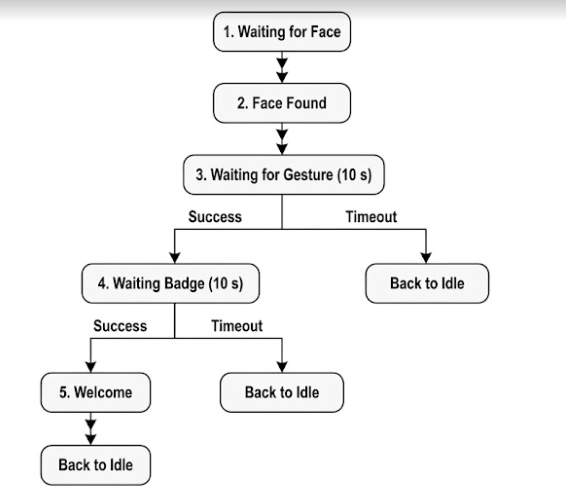
Each state has a single responsibility:
- Waiting for Face — Detect whether a visitor has arrived.
- Waiting for Gesture — Wait for an Open Palm gesture to confirm the visitor.
- Waiting for Badge — Read the visitor’s ArUco badge.
- Welcome Visitor — Play the welcome message before resetting for the next visitor.
The program also uses debouncing for gesture recognition and badge detection. Instead of reacting immediately to every prediction, BonicBot waits until the same gesture or badge has been detected consistently for several consecutive frames. This reduces false detections caused by temporary tracking errors.
Finally, timeout timers ensure the robot never gets stuck waiting forever. If the visitor doesn’t complete a step within the allowed time, BonicBot safely returns to its initial waiting state.
Student Challenge
Extend the visitor check-in system to log the time each visitor successfully checks in.
For example, write to a text file checkin_log.txt:
Alice checked in at 14:35:29
Charlie checked in at 15:10:02
Hint
You can use Python’s built-in file handling to append a line to a file every time a visitor is welcomed.
Example:
with open("checkin_log.txt", "a") as file:
    file.write(f"{visitor_name} checked in at {ts}\\n")
Add this logic inside the STATE_WAIT_BADGE block where the visitor is recognized.
Reflection Question
This project combines several independent AI systems into one application.
Why do you think BonicBot separates the visitor check-in process into multiple states instead of trying to detect faces, gestures, and badges simultaneously throughout the entire interaction?